
sales@tech4drive.com

Free Shipping on Bulk order

  • About
  • Contact
  • Sign In/Sign Up
Tech4Drive Logo

CALL US NOW

(833) 781-8723 sales@tech4drive.com
0
0 Item(s) View Cart
Total $0.00
All
Categories
  • MEMORY
  • CPU
  • HARD DRIVES
  • SSDS
  • LTO
  • MOTHERBOARDS
  • VIDEO CARDS
  • POWER SUPPLY

Memory By Brand

  • Crucial Memory
  • HP Memory
  • Hynix Memory
  • IBM Memory
  • Micron Memory
  • Oracle Memory
  • Sun Memory
  • Show All

Memory By Capacity

  • 64GB Memory
  • 32GB Memory
  • 16GB Memory
  • 8GB Memory
  • 4GB Memory
  • 2GB Memory
  • 1GB Memory
  • Show All

Memory By Type

  • DDR4 LRDIMM
  • DDR3 LRDIMM
  • DDR4 SDRAM
  • DDR3 SDRAM
  • DDR2 SDRAM
  • Show All

CPU By Socket

  • AMD
  • Socket AM2
  • Socket AM2+
  • Socket AM3
  • Socket FM1
  • Socket FM2+
  • Socket G34
  • Intel
  • LGA 1150
  • LGA 1155
  • LGA 1366
  • LGA 2011
  • LGA 2011 V3
  • LGA 771
  • LGA 775
  • Show All

CPU BY BRANDS

  • AMD CPU
  • Fujitsu CPU
  • HP CPU
  • IBM CPU
  • Intel CPU
  • Sun CPU
  • Toshiba CPU
  • Show All

HDD BY BRANDS

  • Apple Hard Drives
  • EMC Hard Drives
  • Fujitsu Hard Drives
  • HP Hard Drives
  • Hitachi Hard Drives
  • IBM Hard Drives
  • Maxtor Hard Drives
  • NetApp Hard Drives
  • Quantum Hard Drives
  • Seagate Hard Drives
  • Sun Hard Drives
  • Toshiba Hard Drives
  • Western Digital Hard Drives
  • Show All

HDD by Interface

  • Serial-ATA (SATA)
  • Serial Attached SCSI (SAS)
  • Fibre Channel (FC)
  • ATA/IDE (PATA)
  • Show All

SSD by Brand

  • Crucial SSD
  • EMC SSD
  • HP SSD
  • Hitachi SSD
  • IBM SSD
  • Innodisk SSD
  • Intel SSD
  • Micron SSD
  • OCZ SSD
  • Seagate SSD
  • SiliconSystems SSD
  • Stec SSD
  • Super Talent SSD
  • Toshiba SSD
  • Transcend SSD
  • Western Digital SSD
  • Show All

SSD by Interface

  • Serial-ATA (SATA)
  • Serial Attached SCSI (SAS)
  • PCI Express
  • Show All

SSD by Form Factor

  • mSATA
  • M.2 (NGFF)
  • 2.5-inch Drive
  • 3.5-inch Drive
  • Add-in Card
  • DOM

SSD by Flash Type

  • SLC SSD
  • MLC SSD
  • TLC SSD
  • Show All

MB By Socket

  • AMD Intel
  • Socket G34 Socket 3647
  • Socket TR4 Socket 2066
  • Socket AM4 Socket 2011-v3
  • Socket AM3+ Socket 2011
  • Socket AM3 Socket 1366
  • Socket AM2+ Socket 1155 V3
  • Socket AM2 Socket 1151
  • Socket FM2+ Socket 1150
  • Socket FM2 Socket 775
  • Socket FM1 Socket 771
  • Show All

MB By Brand

  • AMD Motherboards
  • Asus Motherboards
  • ASRock Motherboards
  • EVGA Motherboards
  • Gigabyte Motherboards
  • HP Motherboards
  • IBM Motherboards
  • Intel Motherboards
  • MSI Motherboards
  • Supermicro Motherboards
  • TYAN Motherboards
  • Show All

MB by Form Factor

  • ATX
  • E-ATX
  • Flex-ATX
  • Micro-ATX
  • Mini-ITX
  • Thin Mini-ITX
  • uATX
  • Show All

MB by Chipset

  • Intel X299
  • Intel H370
  • Intel B360
  • Intel H310
  • Intel Z370
  • Intel X99
  • Intel Z270
  • Intel H270
  • Intel B250
  • Show All

MB by Interface

  • Serial-ATA (SATA)

Video Cards By Brand

  • Asus Video
  • ATI Video
  • EVGA Video
  • Nvidia Video
  • PNY Video
  • Show All

VCB by Interface

  • PCI Express
  • Show All

Power Supply By Brand

  • Cooler Master Power Supply
  • EVGA Power Supply
  • HP Power Supply
  • Intel Power Supply
  • Sparkle Power Supply
  • Show All

Power Supply by Interface

  • Serial-ATA (SATA)
  • Show All
Choosing the Best Memory for Your Old Computer: Focus on Compatibility

Choosing the Best Memory for Your Old Computer: Focus on Compatibility

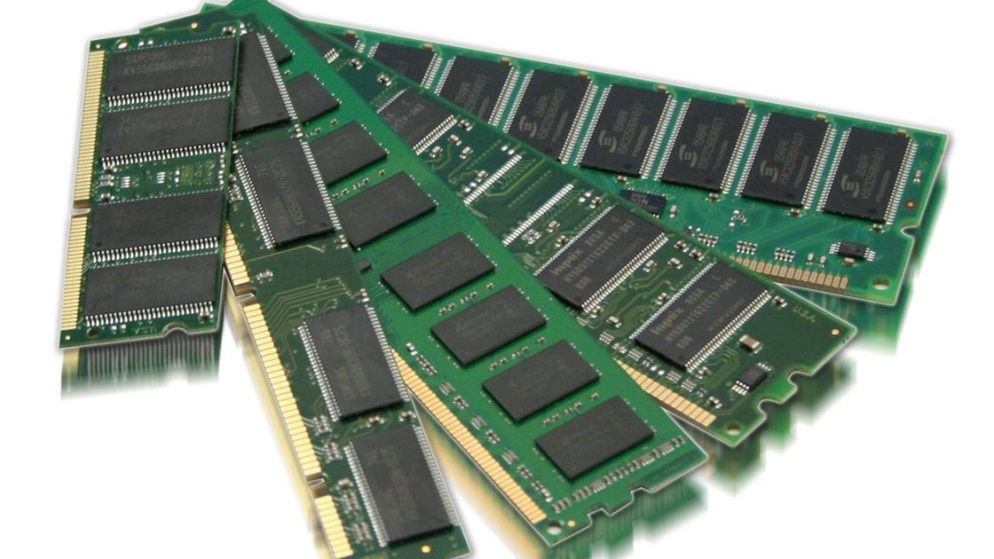
Upgrading the memory (RAM) of your old computer can breathe new life into its performance, allowing it to handle modern applications and tasks more effectively. However, selecting the right memory upgrade requires careful consideration of compatibility to ensure a seamless integration and optimal performance boost.

Understanding Compatibility: A Crucial Aspect

Compatibility is the cornerstone of a successful memory upgrade for your old computer. It involves ensuring that the new memory module you choose is compatible with your computer's existing hardware, including the motherboard, processor, and operating system. Failing to consider compatibility can result in issues ranging from the memory not being recognized to system instability.


Key Factors to Consider

Memory Type: Determine whether your computer uses DDR3 or DDR4 memory. Mixing different types of memory can lead to compatibility issues and may not provide the desired performance improvement.

Memory Capacity: Assess your computer's maximum supported memory capacity. Check the motherboard specifications or consult the manufacturer's documentation to ensure you're not exceeding the supported limit.

Memory Speed: Consider the memory speed (measured in MHz) that your old computer can handle. While faster memory may be appealing, installing memory with a speed higher than what your system supports can result in downclocking, limiting the performance gain.

Form Factor: Ensure that the physical form factor of the memory module matches the slots on your motherboard. Common form factors include DIMM (desktop) and SODIMM (laptop) modules.

Operating System: Some older operating systems may have limitations on the amount of memory they can utilize. Check the requirements of your operating system to ensure your upgrade will be beneficial.

Memory Channels: Check whether your computer uses single-channel or dual-channel memory architecture. Installing memory in pairs (dual-channel) can provide better performance in certain scenarios.

Voltage: Confirm the voltage requirements of your computer's memory slots. Using memory modules with incorrect voltage can cause damage to the memory or other components.


Keywords

  • Memory upgrade
  • Old computer
  • Compatibility
  • RAM
  • DDR3
  • DDR4
  • System performance
  • Memory type
  • Memory capacity
  • Memory speed
  • Form factor
  • Operating system
  • Memory channels
  • Voltage

Other Blogs

  • Micron MTA36ASF4G72PZ-2G3B1 Memory Module: Unleashing Reliable and High-Capacity Server Memory Micron MTA36ASF4G72PZ-2G3B1 Memory Module: Unleashing Reliable and High-Capacity Server Memory
  • Samsung M393A4K40BB0-CPB0Q Memory Module: Unleashing High-Performance Memory Solutions Samsung M393A4K40BB0-CPB0Q Memory Module: Unleashing High-Performance Memory Solutions
  • HPE 805353-B21 Memory Module: Elevating Server Efficiency with Advanced Memory Solutions HPE 805353-B21 Memory Module: Elevating Server Efficiency with Advanced Memory Solutions
  • HPE 805358-B21 Memory Module: Enhancing Server Performance with Reliable Memory Solutions HPE 805358-B21 Memory Module: Enhancing Server Performance with Reliable Memory Solutions
  • Intel BX80662I56600K Desktop Processor: Unleashing Powerful Performance for Gaming and Beyond Intel BX80662I56600K Desktop Processor: Unleashing Powerful Performance for Gaming and Beyond
  • Intel BX80662I76700K Desktop Processor: Unleashing Elite Performance for Power Users Intel BX80662I76700K Desktop Processor: Unleashing Elite Performance for Power Users
  • Intel RH80535NC013512 Processor: Unleashing Computational Power with Precision Intel RH80535NC013512 Processor: Unleashing Computational Power with Precision
Tech4Drive Logo

payment methods

About

  • About Us
  • Contact Us
  • Innovation Hub
  • Privacy Policy
  • Return

Why Choose Us ?

  • Trusted by Worldwide Buyers
  • Technical Support
  • Flexible Payment

Get in touch

6400 VILLAGE PKWY STE 105 DUBLIN, CA 94568

questions?

(833) 781-8723

sales@tech4drive.com

Tech4drive © 2024. All Rights Reserved

Categories
    • MEMORY
    • CPU
    • HARD DRIVES
    • SSDS
    • LTO
    • MOTHERBOARDS
    • VIDEO CARDS
    • POWER SUPPLY
    • CONFIGURATOR

You've just added this product to the
cart:

adding cart image